Looking for a simple IPTV Firestick setup guide? You’ve come to the right place. In this complete guide, we’ll show you exactly how to install IPTV on Firestick step by step — no technical knowledge required. Whether you’re a beginner or switching from another service, this IPTV Firestick tutorial will get you streaming in minutes.
IPTV Firestick Setup – Complete Guide 2026
Setting up IPTV on your Firestick is much easier than you think. In this complete step-by-step guide, we’ll show you exactly how to install and configure your MyTVWay UK IPTV subscription on your Amazon Firestick in just a few minutes. No technical experience required!
Choosing the Right IPTV Firestick App
There are several IPTV Firestick apps available. Here are the best ones with their Downloader codes:
- IPTV Smarters Pro – Free – Downloader Code: 6421807
- XCIPTV – Free – Downloader Code: 3593843
- Tivimate – Paid – Downloader Code: 185194
- IBO Player Pro – Paid – Downloader Code: 395800
In this guide we will use IPTV Smarters Pro. All apps follow the same setup method. If you need help, contact us via WhatsApp.
What You Need Before Starting
- An Amazon Firestick or Fire TV device connected to your TV
- A stable internet connection (minimum 20 Mbps recommended)
- An active MyTVWay UK IPTV subscription with your login credentials
Step-by-Step: IPTV Firestick Installation Guide
Step 1 – From the home screen, hover over the Find option
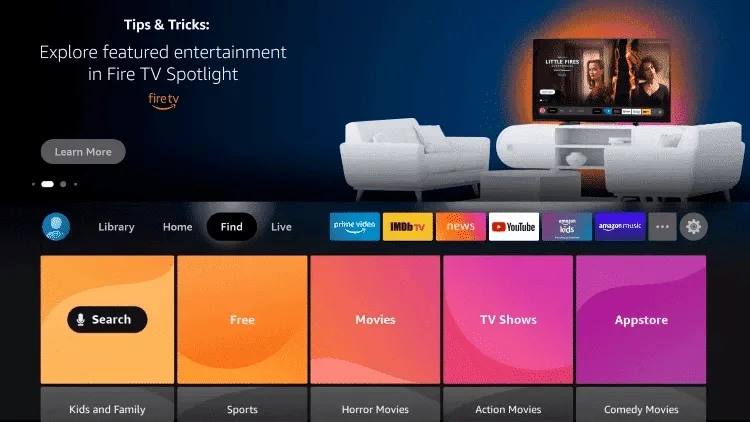
Step 2 – Click Search
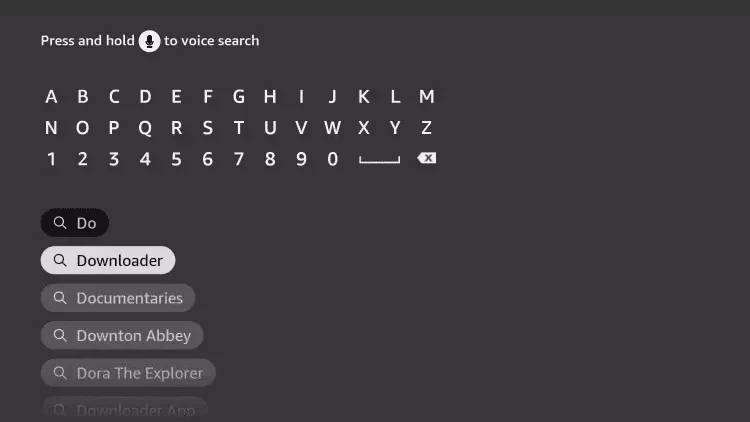
Step 3 – Search for and select Downloader
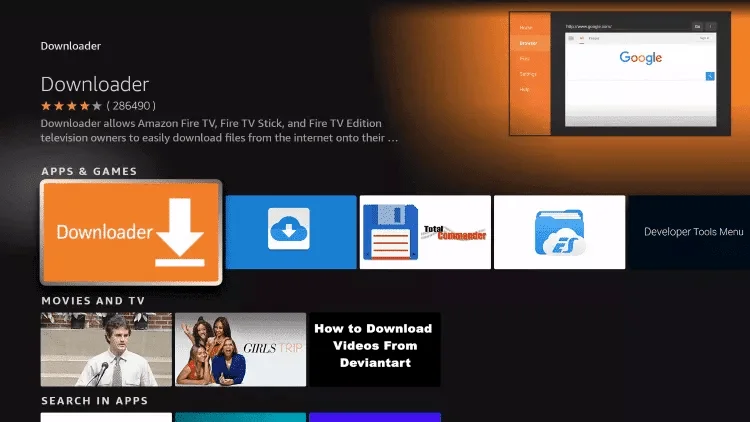
Step 4 – Choose the Downloader App
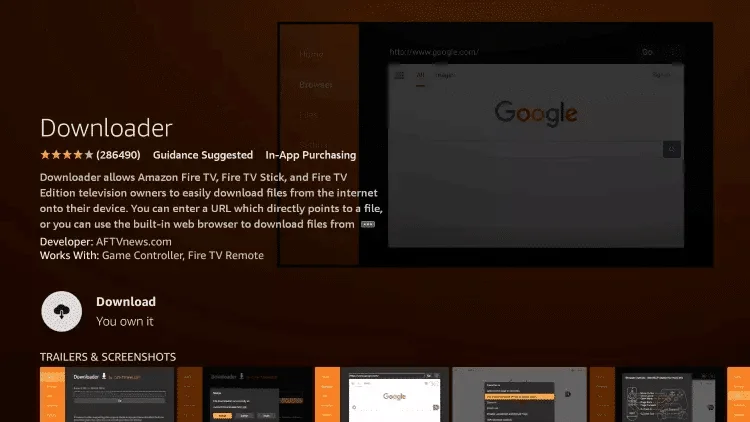
Step 5 – Click Download
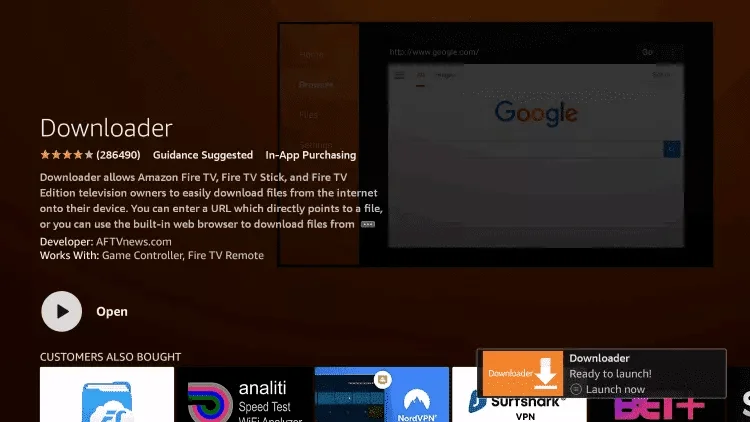
Step 6 – Once the app finishes installing, click Open
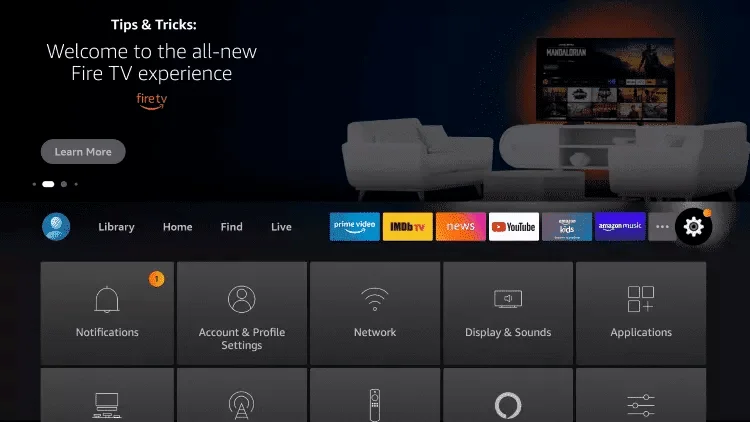
Step 7 – Return to the home screen and open Settings
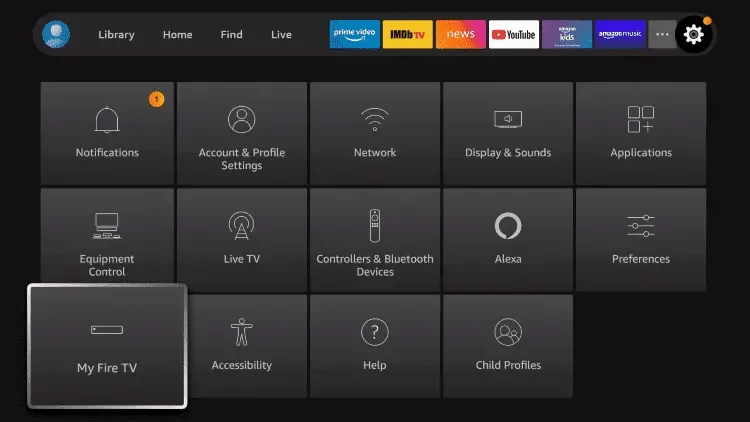
Step 8 – Click My Fire TV
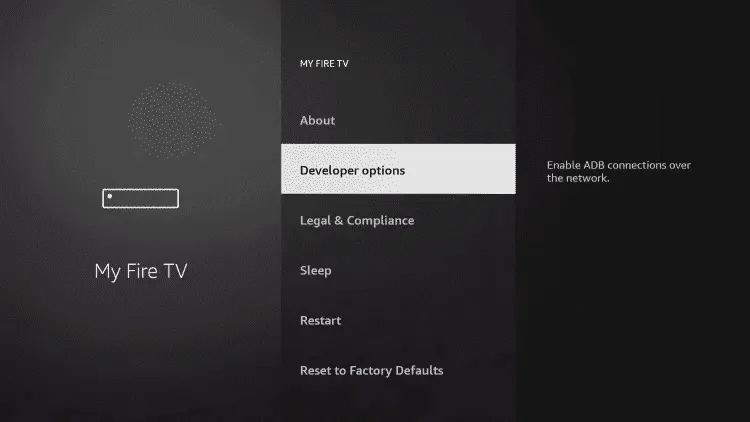
Step 9 – Choose Developer Options
⚠️ If you don’t have Developer Options enabled, watch the video below:
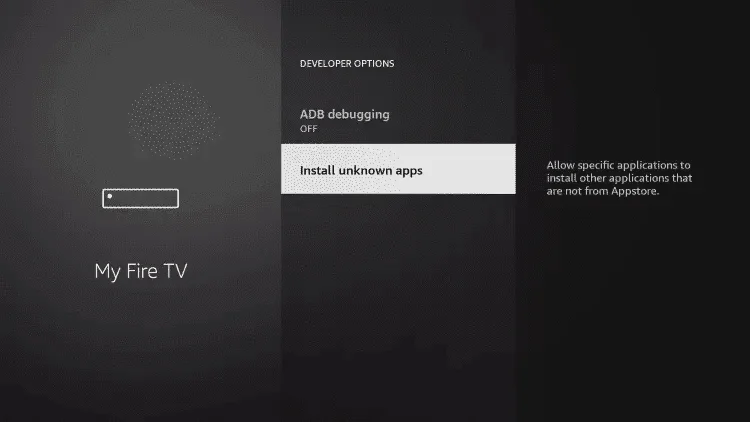
Step 10 – Click Install Unknown Apps
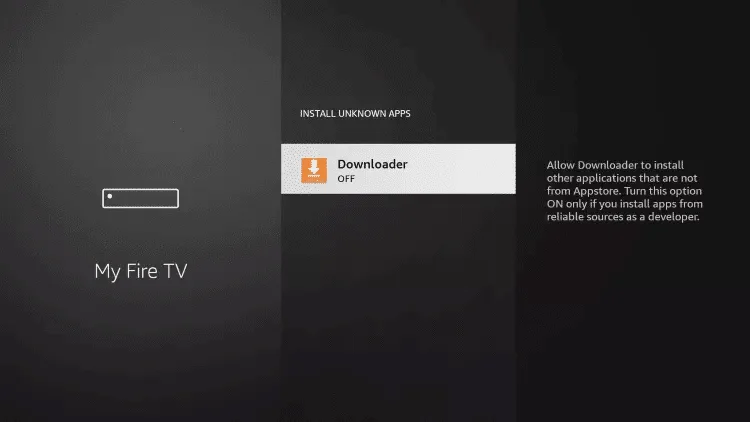
Step 11 – Find the Downloader app and click it
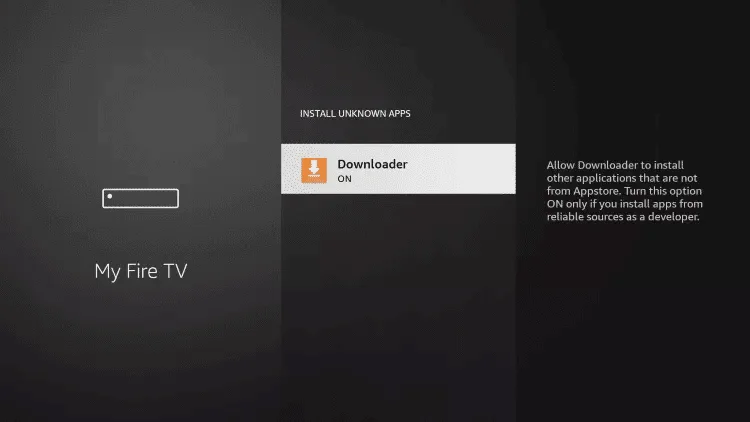
Step 12 – Turn Unknown Sources to ON for the Downloader app
This will enable side-loading on your Firestick device.
Step 13 – Launch Downloader
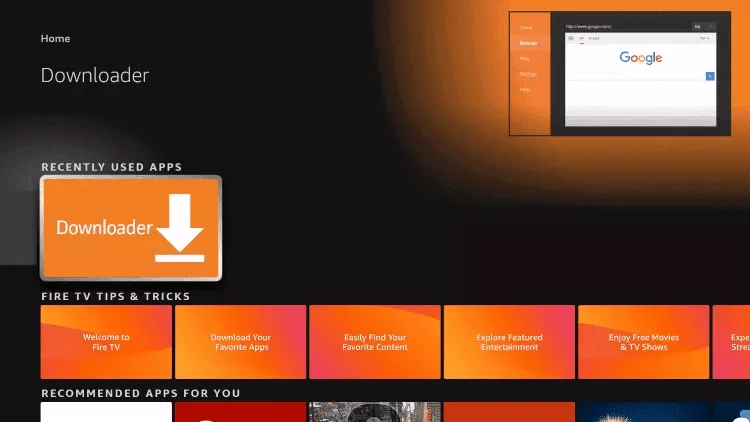
Step 14 – Click Allow
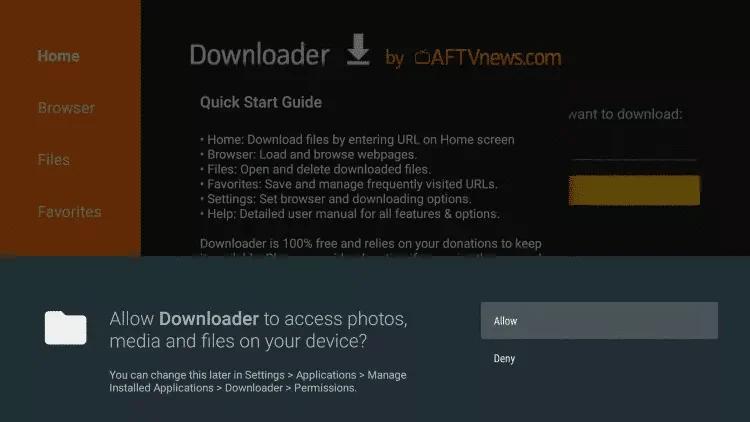
Step 15 – Click OK
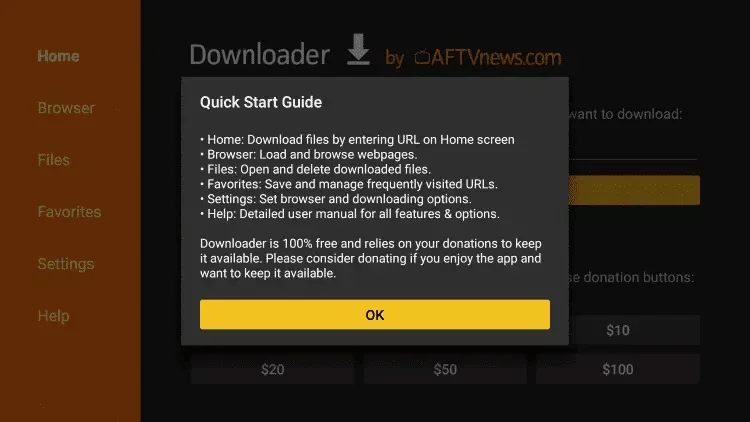
Step 16 – Type the Downloader Code and click Go
Enter one of the following codes:
- IPTV Smarters Pro – Code: 6421807
- XCIPTV – Code: 3593843
- Tivimate – Code: 185194
- IBO Player Pro – Code: 395800
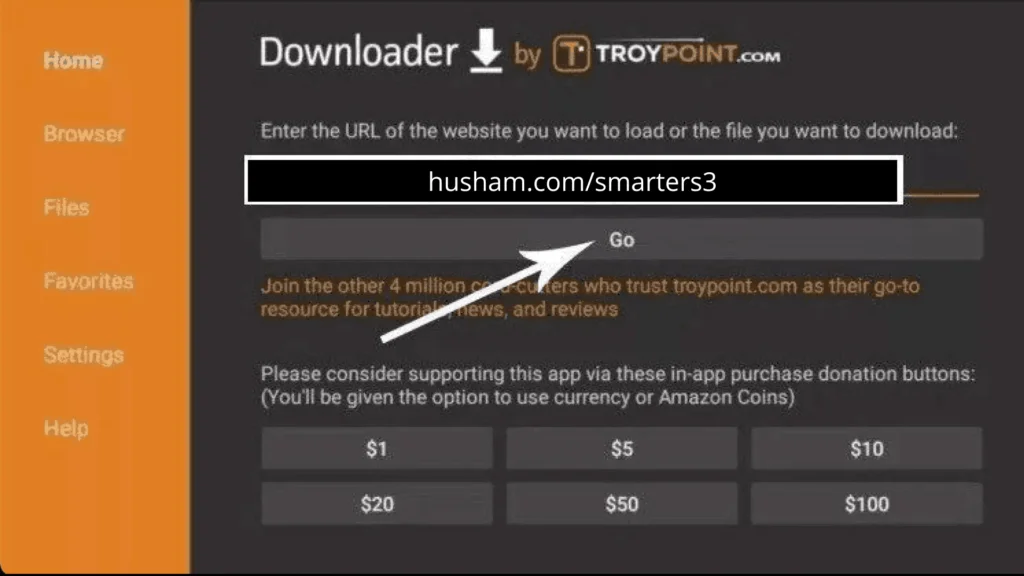
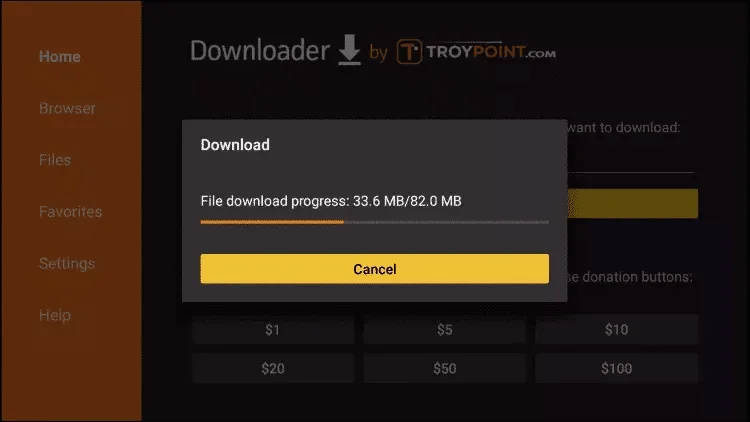
Step 17 – Wait for the file to download
Step 18 – Click Install
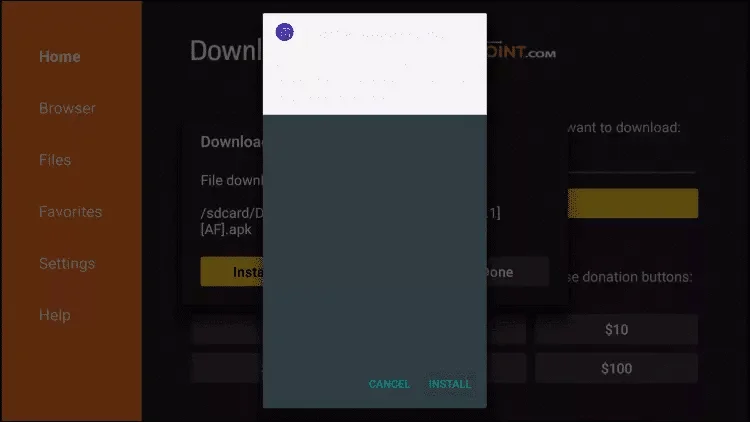
Step 19 – Click Done
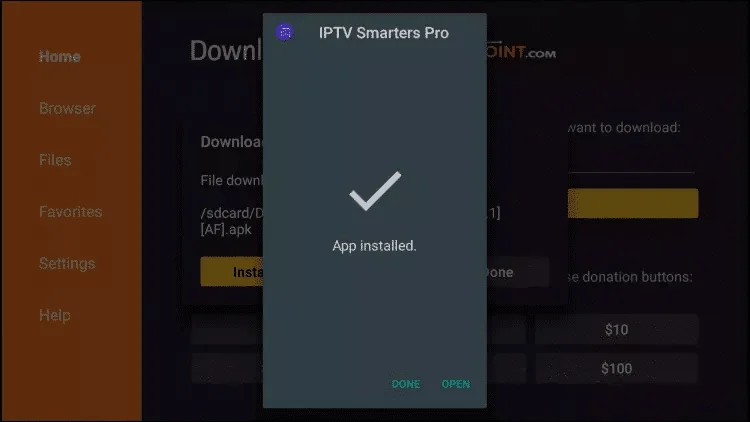
Step 20 – Open the app and login with Xtream Codes API
Open IPTV Smarters Pro and choose Login with Xtream Codes API. Enter your MyTVWay login details:
- Name: Anything you like
- Username: Found in your confirmation email or WhatsApp
- Password: Found in your confirmation email or WhatsApp
- URL: Found in your confirmation email or WhatsApp (starts with http://)
⚠️ If you see “Authorization Failed” — double check your inputs. Make sure there are no typos and that your VPN is turned off.
🎉 You’re All Set!
Congratulations! You have successfully set up IPTV on your Firestick. You now have access to 50,000+ live UK channels, 180,000+ movies and series in stunning 4K/8K quality with MyTVWay!
Need help? Contact our 24/7 support team via WhatsApp and we’ll guide you through every step. Don’t have a subscription yet? Get your MyTVWay UK IPTV plan from just £11.99/month with a 7-day money back guarantee!
You can also check our UK IPTV installation guide for setup instructions on Android, iPhone and iPad, Smart TV, Windows PC and more.
Troubleshooting IPTV Firestick Issues
Having issues with your IPTV Firestick setup? Here are the most common problems and solutions:
- “Authorization Failed” error — Double check your username, password and server URL. Make sure there are no extra spaces before or after and your VPN is turned off.
- Buffering or freezing — Ensure your internet speed is at least 20 Mbps. Try connecting to 5GHz WiFi or use ethernet adapter for better stability.
- App won’t install on Firestick — Make sure you enabled “Apps from Unknown Sources” in developer settings. Clear Downloader cache and try again.
- Channels not loading — Close IPTV Smarters Pro completely and restart your Firestick. Clear the app cache from Settings then Applications.
- Black screen when playing channels — Go to Settings then Player Settings and try switching between internal and external player.
- No sound on some channels — Change audio decoder in Settings to “Software” mode and restart the channel.
Still need help with your IPTV Firestick setup? Contact our 24/7 support team via WhatsApp and we’ll guide you through every step.
Alternative IPTV Apps for Firestick
While IPTV Smarters Pro is our recommended app, here are other great IPTV Firestick alternatives you can sideload using the Downloader app:
- TiviMate — Best premium IPTV player with advanced EPG, multi-screen and recording. Downloader code: 217064
- XCIPTV — Free lightweight player perfect for older Firestick models with limited RAM.
- IBO Player Pro — Modern interface with M3U and Xtream Codes support.
- Perfect Player — Another free alternative with clean UI and EPG support.
All of these apps work with your MyTVWay UK IPTV subscription. Simply use the same login credentials provided after purchase.
IPTV Firestick Features and Benefits
Using IPTV Firestick offers many advantages compared to traditional cable or satellite TV. Your Amazon Fire TV Stick is a powerful streaming device that can handle 4K HDR content smoothly when paired with the right IPTV service.
Here’s what makes IPTV Firestick the perfect combination for UK viewers:
- Portable streaming — Take your Firestick anywhere and watch UK TV while traveling. Just plug it into any HDMI TV with WiFi access.
- 4K Ultra HD support — Firestick 4K and Firestick 4K Max support the highest quality streams from MyTVWay including 4K and HDR content.
- Voice control with Alexa — Use the Alexa voice remote to search channels, control playback and launch apps hands-free.
- Massive app selection — Beyond IPTV, your Firestick gives you access to Netflix, Prime Video, YouTube, Disney+ and thousands more apps.
- Affordable price — Firestick is one of the cheapest ways to turn any TV into a smart TV with full IPTV support.
- Fast performance — Modern Firestick devices have enough power to decode 4K streams without buffering.
Firestick Models Compatible with MyTVWay
Our IPTV Firestick service works on every Amazon Fire TV device including:
- Fire TV Stick (3rd Gen) — Full HD streaming with Alexa voice remote
- Fire TV Stick Lite — Affordable entry-level model with Full HD support
- Fire TV Stick 4K — 4K Ultra HD with Dolby Vision and HDR10+
- Fire TV Stick 4K Max — Latest model with WiFi 6 and fastest performance
- Fire TV Cube (2nd Gen) — Hands-free streaming with built-in Alexa speaker
- Fire TV Cube (3rd Gen) — Most powerful Fire TV device with WiFi 6E
- Amazon Fire TV Smart TVs — Toshiba, Insignia and other brands with Fire TV built-in
Tips to Optimize IPTV Firestick Performance
To get the best streaming experience on your IPTV Firestick, follow these optimization tips:
- Use 5GHz WiFi — Connect your Firestick to the 5GHz band of your router for faster speeds and less interference, especially important for 4K streaming.
- Restart regularly — Restart your Firestick once a week to clear memory and keep it running smoothly. Go to Settings then My Fire TV then Restart.
- Clear app cache — Clear IPTV Smarters Pro cache monthly from Settings then Applications then Manage Installed Applications.
- Disable automatic app updates — Prevent Firestick from updating apps unexpectedly by going to Settings then Applications then Appstore and turning off Automatic Updates.
- Use a quality HDMI cable — For 4K streaming, make sure you’re using a HDMI 2.0 or higher cable to avoid picture quality issues.
- Free up storage — Uninstall unused apps to keep enough free storage for IPTV Smarters Pro to run smoothly without lag.
- Enable data monitoring — Monitor your internet data usage from Settings to ensure your WiFi is delivering enough bandwidth for your IPTV streams.
Following these tips will ensure your IPTV Firestick setup runs at peak performance 24/7 with no buffering or quality issues.
Why Choose MyTVWay for IPTV on Firestick?
MyTVWay is the best UK IPTV service for IPTV Firestick users. Our subscription gives you access to 50,000+ live channels, 180,000+ movies and series in 4K/8K quality. With Anti-Freeze technology and 99.99% uptime, you’ll never experience buffering on your Firestick again. Our plans start from just £11.99/month with instant activation and a 7-day money back guarantee. Get your MyTVWay IPTV Firestick subscription today!
Ready to Start Streaming UK IPTV?
Get your MyTVWay subscription today — 50,000+ channels, instant activation, 7-day money back guarantee.
Get Your UK IPTV Plan from £11.99